 BikeOtter
Live tracking for Wahoo ELEMNT and Garmin Edge riders
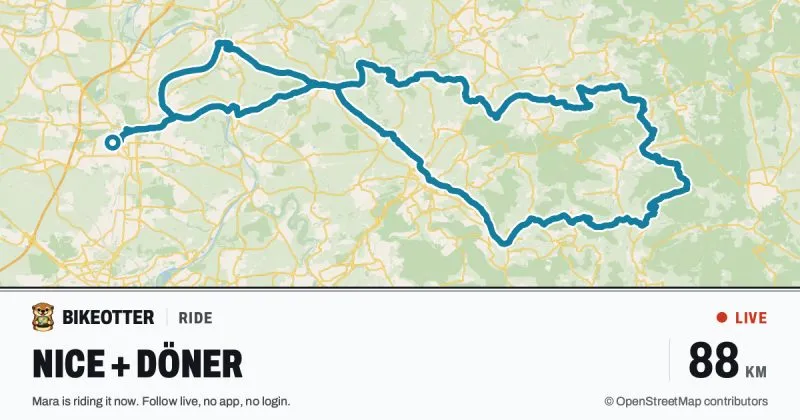
Flip one switch and the people at home get a link. They open it in a browser and see where you are and when you will be back. Free, and nothing to sign up for on their side.

How does live tracking work in BikeOtter?
On the Ride screen, switch on Let them follow along. The first time, you sign in with a link sent to your email, no password. Your phone reads your position from the bike computer and posts it to a private link, bikeotter.app/r/…, which you send to whoever should follow.
Save contacts in groups such as Family or Club, and the default group gets the link by email the moment you go live. With Go live automatically on in Settings, sharing starts and stops with the ride on your head unit.
What do the people at home see?
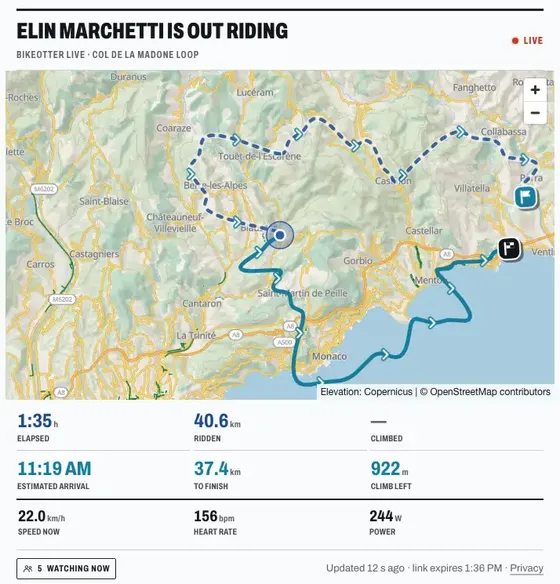
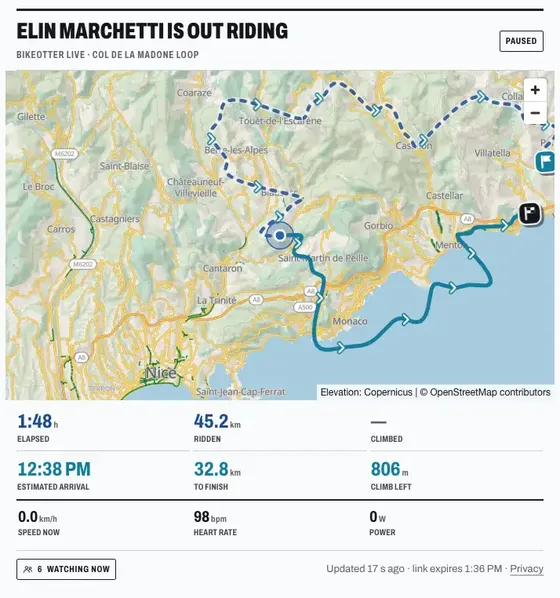
Your route and your GPS trace on a map. The part you've ridden turns dotted, the part ahead stays bright with arrows. Under it: time, distance and climbing so far, what is still to come, and when you'll arrive. Heart rate and power only show if you switch them on. When you stop, the page says PAUSED instead of showing a dot that quietly stopped moving. You see how many people are watching, not who.
Can they see when I'll be home?
Yes, on a ride with a route. The estimate knows about the climbs ahead: instead of dividing the distance left by your average speed, BikeOtter spends your flat-road speed on the rest of the elevation profile. On 20 km to go with an 800 m climb in it, that is 53 minutes different from the simple estimate.
People who got the link by email can also get a short note when you finish, and a heads-up about 15 minutes before you arrive. That switch, Tell them when you get back, starts off.
Can they send me a message?
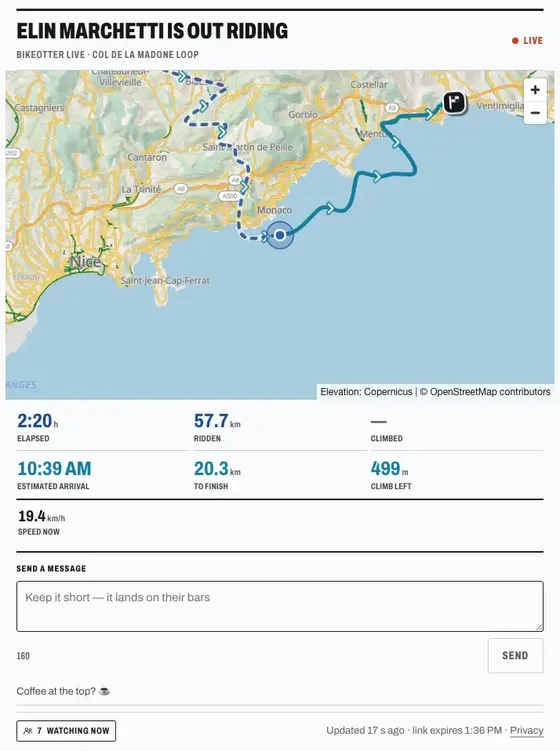
If you allow it for a contact group, yes. A message under five minutes old shows up on your ELEMNT's screen; anything older waits in the app, so nothing pops up halfway down a descent. Up to 160 characters, 3 an hour per person. Followers never need an account or the app: the link opens in any browser.
Does it work with a Garmin Edge?
Yes, in beta, confirmed on an Edge 540. Your followers get the same page as with an ELEMNT. Heart rate, power and cadence from an Edge need the BikeOtter Live data field from the Connect IQ store. The Garmin page and the Wahoo page track what works on each unit.
What about group rides?
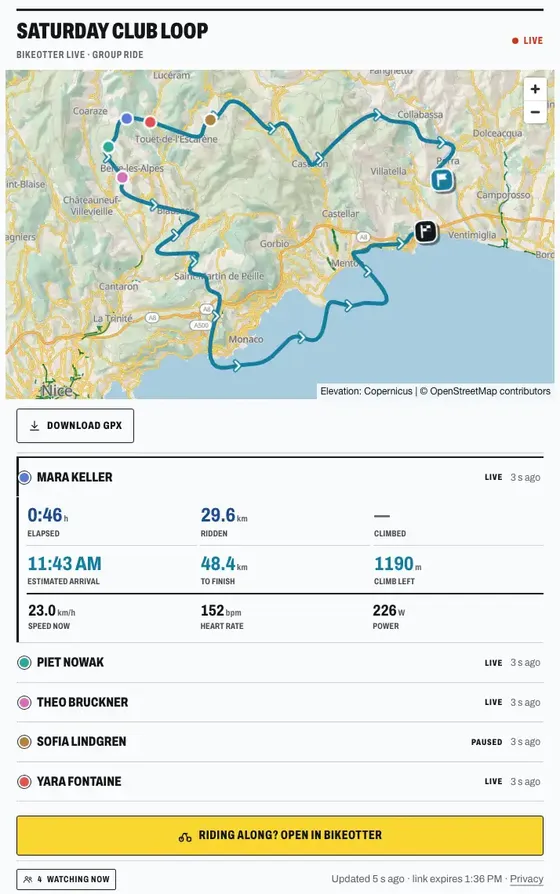
Host a group ride and every rider is on one map, with a roster of who is riding, paused or behind.
What if my phone battery or signal drops?
At 10% and not charging, the page tells followers your battery is low (never a percentage), and the app sends your position less often to make it last. A tunnel or a valley costs you that stretch and no more: the trace refills when signal is back, and an app restart picks up the same link. On iPhone a Live Activity on the Lock Screen shows how many people are watching.
How does this compare with Wahoo Live Track and Garmin LiveTrack?
Both bike computer makers have their own, and they are the first thing to try. If Wahoo's stops working, this guide to Wahoo Live Track not working goes through the fixes. Per Wahoo's help page, Live Track needs the Wahoo app connected all ride. Garmin LiveTrack lives in Garmin Connect, per the Edge 540 manual. BikeOtter needs a phone with data too. What it adds:
- one kind of link for an ELEMNT and an Edge, so a mixed group follows the same way
- an arrival time that accounts for the climbs ahead, and a note when you get in
- the low-battery notice, and messages from home onto the ELEMNT
- rebuilding a ride from the live track if your unit's recording comes back empty (Plus)
Is it free, and what is stored?
Live tracking is free and stays free. Plus adds messages from followers, ride rebuilding and hosting group rides (pricing).
The link is 20 random characters, and anyone holding it can watch. It stops working 6 hours after you start it, or after 45 minutes without a word from your phone. The session and every point in it are deleted 7 days after the ride ends. The privacy policy lists every field, and the feature book has the rest.
Get BikeOtter
Free on iPhone and Android. Your bike computer needs to be set up in its maker's own app once; after that, pair it in BikeOtter.